
System Options - HR Options
The HR Options tab is only available with hr.
It contains options for the display of Hourly Rates in hr pages and for the HR > Positions page in Employee Self-Service Kiosk.
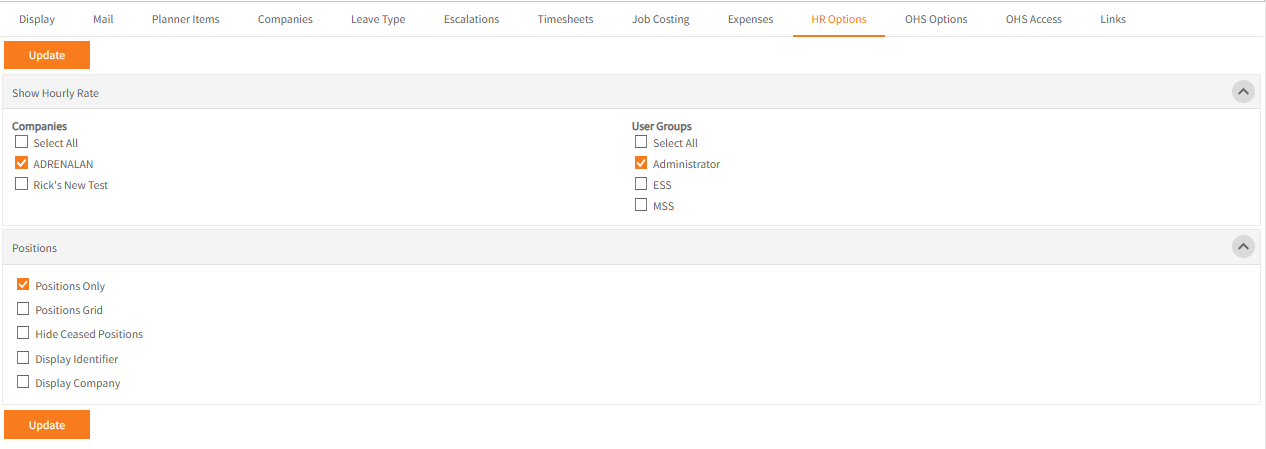
Show Hourly Rate
To display employee’s hourly rates in various HR pages in Employee Self-Service Kiosk select the appropriate Companies and User Groups and click Update to save.
Positions
These options control the display in HR > Positions in Employee Self-Service Kiosk.
- Positions Only – hides the Positions separator between levels of the Org Chart.
In Ready Pay, with this option off, selecting the appropriate Positions separator on the left-hand side enables deletion of ceased positions in this level.
Deletion is not possible in Employee Self-Service Kiosk and must be done in Ready Pay. -
Positions Grid – displays a grid on the right-hand side of all positions when Positions is selected top-left, rather than just the top-level position.
It also works in conjunction with Positions Only.
If that option is off, a grid of all the positions at that level of the Organisation Chart displays on the right-hand side when the Positions separator is selected on the left-hand side. -
Hide Ceased Positions – hides positions with a redundant date.
-
Display Identifier – displays any Identifier if entered for a position on the left-hand side
-
Display Company – displays the company a position relates to on the left-hand side